更多筛选条件

Netro

Emilio Maione
更新时间 2019-04-25 15:49:02 UTC 
话题: Netro App
Come posso aggiungere skill netro in italiano grazie 
浏览: 12775   评论: 2

Device sharing between multiple users

Netro Support
更新时间 2019-07-29 03:11:08 UTC 
话题: Netro App
Device sharing between Netro users is supported. A user can authorize multiple users to access his or her Netro products.

To give access to other users, please log in your Netro account, go to Settings->Controller->Manage Users.

Note: Shared users must have a Netro account.


Add or delete users

Device owner can add or delete users through adding or deleting their user name or email account.

Tap “Manage Users” to authorize other users to access the device owner’s Netro products.


Tap “Manage Users” and then you will be directed to the “Users” Page.

Then you can add new manager or new player by tapping the “+” button.


Tap the “+” button and input the user name or user account.

Please input the user name or user account.


Tap “save” and then the user can have access to owner’s shared device.

Users’ information is displayed on “Users” page.


Once users are added, shared users will be shown on “Users” page.


 Access rights of shared users


There are two different types of shared type: Manager and player. Manager and player have different access rights. Manager has more access rights than player. Both manager and player cannot delete controller, change address, delete or add sensor.

Note: Shared users must have a Netro acccount.

Manager’s access rights:

Manager can use all the features of the shared device except deleting controller, changing address, deleting or adding sensor.

Player’s access rights:

a. Read-only: All settings in Controller, Sensors, Program(except run a cycle), Zone list can not be edited.

b. Hide: Preferences, Regulations, Restrictions, zone detail are not shown on Settings page. Regulations events and Restrictions events created by users are not shown on Schedule page.

c. Access to Schedule page: Player can create a one-time Run or Rain Delay on Schedule page.

d. Access to Program:Player can only do “run a cycle now” to programs created by device owners. Player can create a one-time Run or Rain Delay on Schedule page.


浏览: 14371   评论: 4

Kickstarters for Pixie, the Smart Hose Faucet Timer

Netro Inc
更新时间 2019-06-05 01:59:12 UTC 

To the Netro community:


We are very excited to introduce our new product, Pixie, the WiFi-connected Hose Faucet Timer. We have spent almost a year designing and developing the smart timer and now it is ready to meet the users.  


We believe Pixie is a great choice if you have water systems running through hose faucet. It is as smart as Sprite and can pair with Whisperer. It is solar powered and has a removable battery for quick charge. If you like the features in the Netro app, it has all the access to them.


For more information about Pixie, please email to info@netrohome.com or simply leave a message/comment below and we will send you a promotion code for the first 50 buyers.


Thanks,

Netro Inc

浏览: 384498   评论: 24

Notice To Users of Weather Underground

Netro Inc
更新时间 2019-03-19 04:52:48 UTC 

Notice of obsoleting Weather Underground


Netro has changed the weather source Weather Underground to Dark Sky from the server side for users of Weather Underground. The reason is Weather Underground stopped its API service without any notice. The whole community is looking for solutions. So we have internally disabled the Weather Underground option and used the data from Dark Sky.


We will support AccuWeather and openWeatherMap in the next release of the app. We expect to launch it early next month.

We are sorry about the inconvenience. Please contact us if you have any questions.


Regards,

Netro

浏览: 11581   评论: 0

Instructions about Replacing Orbit System

Netro Support
更新时间 2019-03-20 08:07:49 UTC 
话题: 安装

Replacing Orbit system


This page lists some instructions about replacing the common types of Orbit system with Netro smart watering controller. 


Example 1:

 Replacing Orbit model with Netro (model 57114-WT2X 4 stations)


You have 2 common wires and you can insert them into the 2 C slots in the Sprite controller.

You have 4 zones and you can use the 1-4 slots in Sprite to connect the 4 zone wires.

The last step is to hook up the 2 power wires using the Netro power adapter.


浏览: 13244   评论: 0

Plant Sensors Monitoring Multiple Zones

Netro Support
更新时间 2019-08-07 06:39:15 UTC 
话题: Netro App

To the Netro community:


We recently have launched an update for the Netro app on App Store and Google Play. In the newest version of the app, we allow one sensor to monitor up to 3 zones but the user needs to make sure the zones have similar environmental conditions.


Please upgrade your app to the newest version and go to Settings->Sensors, select a sensor, go to Zones and select the zones you would like to monitor.


After saving the changes, you can go to the Home page and check the topsoil moisture level of your zones reported by sensor.


Please feel free to explore other new and exciting features that we just added : 

1.Support Apple Watch

(only available for iOS )


2.Support Weather Underground PWS

(Settings->Controller->Weather Provider)


3.Rainfall adjustment

(Please go to the Discover page and tap the "+" button on the upper right corner,  select "Correct Rainfall")


Regards,

Netro Support


浏览: 11619   评论: 3

Instructions about Replacing Hunter System

Netro Support
更新时间 2019-03-20 08:08:36 UTC 
话题: 安装

Replacing Hunter system


This page lists some instructions about replacing the common types of Hunter system with Netro smart watering controller. 


Example 1:
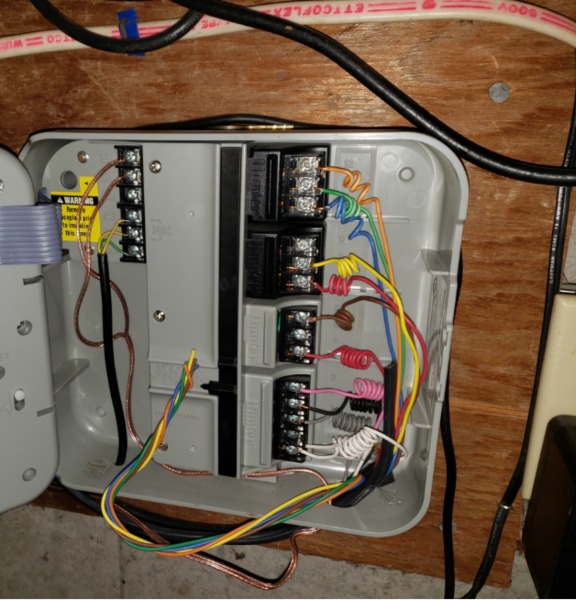

To replace this controller with Netro smart watering controller, please follow the instructions.

The white wires are the common wires which should be connected to the C slots in Netro. Then the zone wires (1,2,3, .. 12) are directly mapped to the 1, 2, 3 .. 12 slots in Netro. The last step is to connect the power (the ground wire is not needed for Netro) then you should be good to go. The power adapter wires are the 2 yellow wires on the left side.

The green one below the yellow wires is the ground wire which is not needed for Netro.

The copper wires are rains sensors which are not needed for Netro either because Netro gets the weather information from WiFi network.


Example 2:
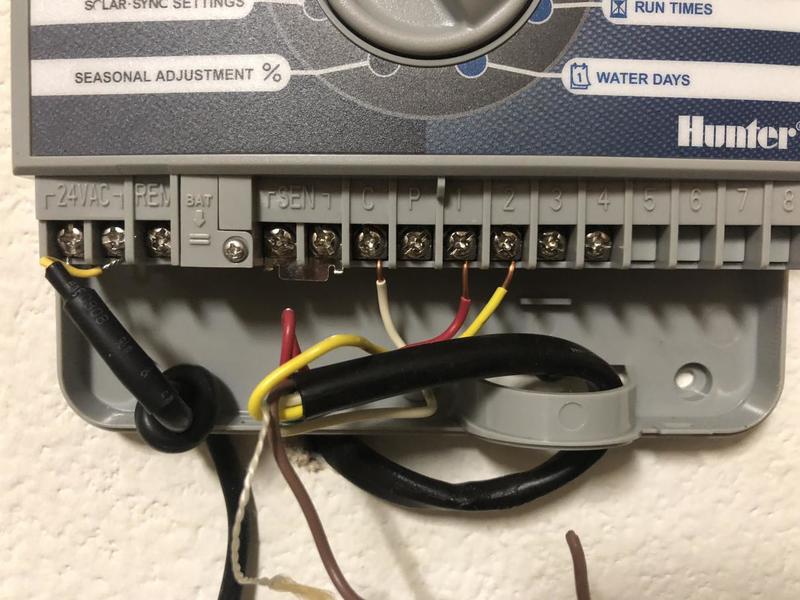
For this system, please connect the white wire to any one of the C slots in Netro. You can leave the M slot of Netro smart watering controller and one of the C slot unconnected.

The last step is to connect the power. The power adapter wires are the 2 yellow wires on the left side.

SEN are rains sensors which are not needed for Netro either because Netro gets the weather information from WiFi network.


Example 3:
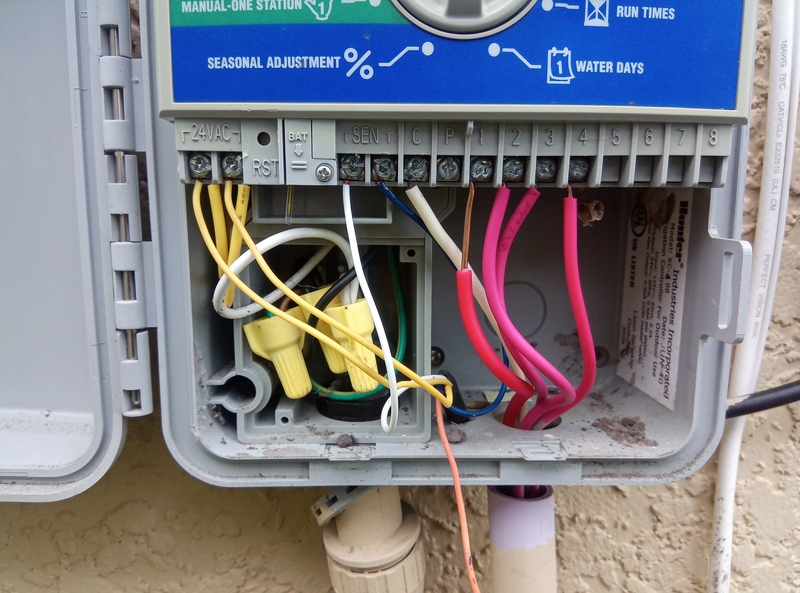

Please connect the white wire to any one of the C slots in Netro. You can leave one of the C slot unconnected.

This system has 3 wires which connects to 24v lines. To replace it with Netro smart watering controller, you can use the existing 24V power(the yellow wires) for your Sprite. It looks like the thinner 2 are the ones but you might just want to try them on Sprite. Or you can use a voltage meter to determine.

If the thinner yellow wires turn out to be the power, than I think the thinner white wire is the common wire which should go to the C slot in Sprite.

SEN are rains sensors which are not needed for Netro either because Netro gets the weather information from WiFi network.

Example 4:
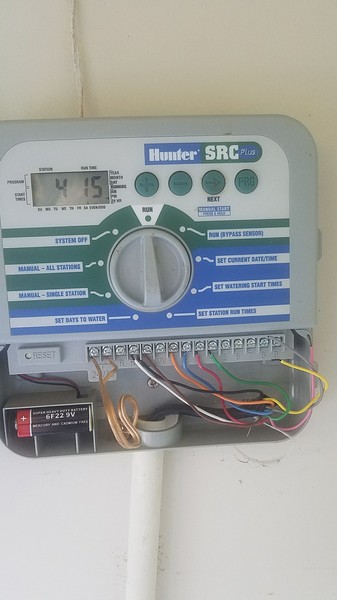
You should connect the white wire(currently on RS) to one of the C slots in Sprite.

You do not need to connect the black wire(currently on C) and the brown wire(currently on RS). RS terminal is the rain sensor. Therefore, you do not need to connect these wires.


Example 5:
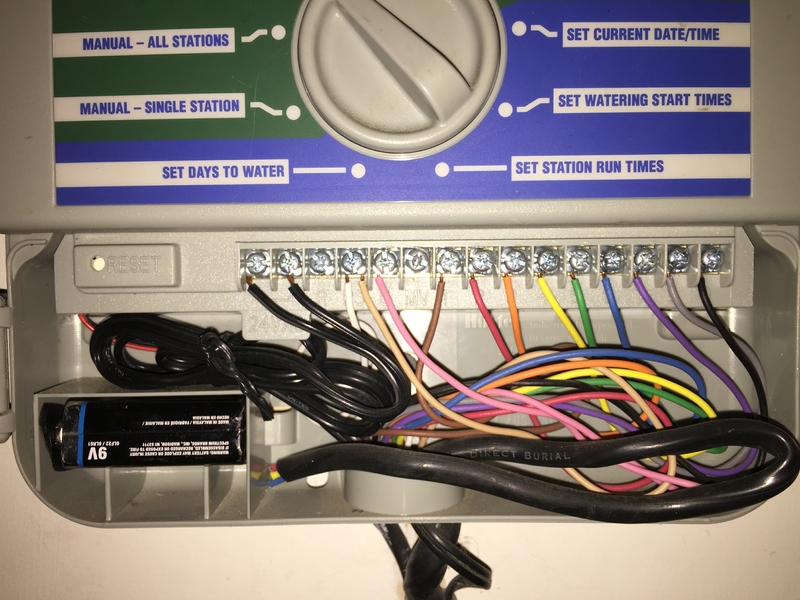
The white wire is the common wire which should be connected to one of the C slots in Netro. The power adapter wires are the 2 black wires on the left side.

RS terminal is the rain sensor. Therefore, you do not need to connect these wires.


Example 6:
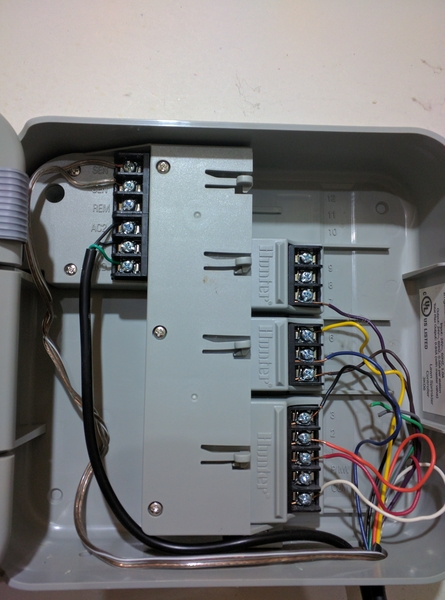
The white wires is the common wires which should be connected to one of  the C slots in Netro. The power adapter wires are the two black wires on the left side.

The green one below is the ground wire which is not needed for Netro.

You do not need to connect the rain sensors because Netro get the weather forecast through WiFi.


Example 7:
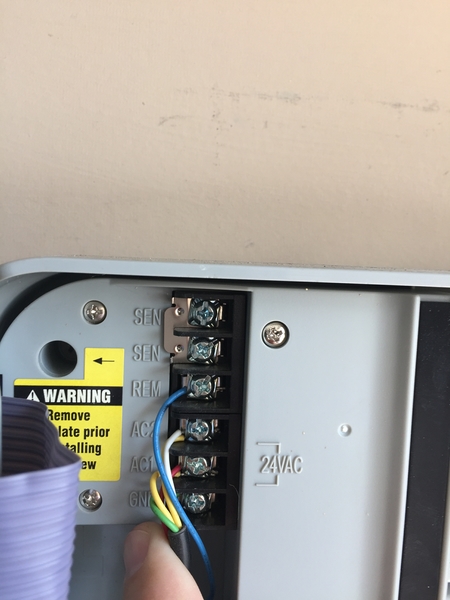
You do not need to connect the blue one (remote). You can just leave it dangling but please use the tape to cover the metal head. The remote feature in Sprite is through the WiFi.

I am not sure about the red and white one. These are the two AV power wires. Normally there is only one wire for AC1 and one wire for AC2. In your case, it looks like the AC power is also sent to another device. The safest way to handle this is to keep this original connection. You might want to "noodle" the wires and insert them into the two "24 VAC" slots in Sprite. Please check out this connector for wire junctions:

https://www.amazon.com/Gardner-Bender-25-AWC-Assortment-Resealable/dp/B000F5TTE8



浏览: 28158   评论: 24

Select suitable plants for slope

Netro Support
更新时间 2018-12-13 07:48:53 UTC 

Select suitable plants for slope


Growing plants in some area with slopes may be more difficult than level gardens. A lot of challenging factors should be taken into consideration, for example, the different soil conditions, the sunlight condition, the slope condition, etc. Netro's smart watering would take care of these factors. Please go to Settings->Zones , select your zone and choose your soil type, slope condition and other settings.


The top priority is to evaluate the pitch and runoff. If the pitch is more than 30 degrees, it might be a good idea to terrace the area to prevent topsoil from eroding and all moisture evacuating every time you water or it rains. Once you have solved any moisture retention and erosion problems, it is time to evaluate the site further for exposure and zone, and plan what plants grow on slopes. The types of plants you choose will depend not only on your visual preference and vision but also the needs of the area. Deep rooted plants help stabilize soil, trees add dimension and shade to prevent excess evaporation, and low growing ground covers cover up unsightly areas with ease of care.


Although growing plants on a hillside can be a challenge, once established they can transform the area and help keep soil from slowly weeping down into the flatter parts of the terrain. Taller shrubs and bushes add many seasons of interest and will help give the area a sculpted appeal. Just remember that young plants will need additional moisture, staking and training as they establish. To keep maintenance down, choose plants that produce very little mess which would otherwise require extra work to clean up annually. Some plants that work well on slopes include:

Burning Bush 

Fragrant Sumac 

Japanese Yew 

California Lilac 

Creeping Juniper 

Dwarf Forsythia 

Snowberry 

Siberian 

Carpet Cypress


Read more at Gardening Know How: Choosing Plants For Sloping Areas – What Plants Grow On Slopes https://www.gardeningknowhow.com/special/slope-hill/plants-that-grow-on-slopes.htm

浏览: 13010   评论: 1

Scheduling ( Two Smart watering levels; Smart disabled)

Netro Support
更新时间 2023-06-09 06:07:25 UTC 

There are 2 different levels of Netro’s smart watering you can choose (For Netro watering controller, please go to Settings->Zones->Smart Zone; for Netro Pixie timer, please go to Settings->Garden->Smart Zone)


 1. Smart watering: Level advanced

This is the default setting of Netro watering controller's smart watering. In this level, your zones will be watered automatically by Netro with smart schedules.

Netro will do everything for you, you do not need to set up the program/schedule.

Netro will skip smart watering and programs when there is large amount of rain(>0.2inch/ 5.08 mm) or watering regulations and manual restrictions.

You can inspect the Smart schedules in the calendar view. They are with the blue water-drop icons.


2.Smart watering: Level basic

This is the default setting of Netro Pixie timer's smart watering. In this level, no smart schedule will be generated. You will need to add programs manually (go to Settings->Programs to add programs) and Netro will skip programs when there is large amount of rain(>0.2inch/ 5.08 mm) or watering regulations.

 If you do not want smart zone schedule to override your own programmed schedule, you can set up the Smart Zone level from Advanced to Basic, which only skip rainning days for your programmed schedule.

Please note when smart zone is enabled, your local regulations will automatic override your own program if there is any conflict. So when you set up your own program watering time, please do not conflict with your local Regulations if there is any. To check up regulations, please go to Settings->Regulations.


3.Smart-zone feature disabled

If you want to create your own programs and turn off smart zone feature and rain delay feature, go to Settings->Zones->Smart Zone (Settings->Garden->Smart Zone for Pixie Timer) and toggle the enable button. When the smart zone is disabled, the system will strictly follow the user program to water the zones. There is no intelligence here. Netro will not skip your schedules when there is rain. Regulation feature will not be in effect as well.


浏览: 21331   评论: 12

Customization->set rain/temperature/wind threshold to skip watering

Netro Support
更新时间 2018-10-13 06:19:08 UTC 

Customization->set rain/temperature/wind threshold to skip watering

Netro automatically creates dynamic watering schedules according to local weather, so if you turn on the smart zone feature for your zone, season adjustment will be made with smart watering schedules according to weather.

There are different types of weather restrictions: rain, temperature and wind.

By default, If you turn on the smart zone feature, Netro will skip the schedules (including manual schedules from user programs) when there is a chance of significant rain(>0.2inch).

The default threshold to skip watering when temperature is too low is 0 Celsius degree (32 Fahrenheit) for all the Netro controllers.

You can now customize rain, temperature and wind threshold through Settings->Preferences.


浏览: 11739   评论: 0

Put Sprite in "paused" mode in winter

Netro Support
更新时间 2023-11-07 06:09:05 UTC 
话题: Netro App

Put Sprite in "paused" mode in winter 


To put Sprite in "paused" mode in winter, you will have winterize your system. First you will have to blow out the sprinkler. You can look at this video to find some useful information. 

https://www.youtube.com/watch?v=s3YRbJYmvgA&t=99s


This video mentioned that you will have to turn on the sprinkler, so you can use the instant manual run feature in the home page to manually start watering for each zone to make sure all the water is out of system.


Then you should put Sprite in "paused" mode just in case some one (for example the kids) accidentally starts a manually run from the app. To put Sprite in "paused" mode, you can go to the Home page->"Enabled". 


浏览: 13645   评论: 1

Water Restriction Helps You Save Water

Netro Support
更新时间 2018-06-04 10:03:46 UTC 


Why should we conserve water? Water is under threat from many sides. It faces pollution problems, outdated infrastructure, rising costs, and unprecedented droughts and rainfall patterns as the climate changes. Only 1% of the entire water supply in the world is available for human and animal use. 97% is salt water and the remaining 2% are in forms of ice caps or glaciers. People all over the world use this 1% for agriculture, manufacturing, community and personal household needs, and for sanitation operations.

Nowadays drought conditions occur everywhere. There's been a lot of news and talk about the drought condition we're having and saving water. Depending on climate conditions, California, Texas, Nevada and many other states have strict rules about when and how much water is allowed for home irrigation. States and cities are forced to implement mandatory water conservation programs. However, Netro honors your local watering regulations if exact location is provided and will inform you when restrictions apply. With Netro, you will not need to worry about fees and penalties. Netro will automatically upload your local water conservation regulations to your controller and cut down your water usage based on these requirements. You can go to Settings->Regulations to see your local water restrictions.

You still pay for each drop of water in your home, whether you use it or not. By using water wisely and eliminating leaks, the extra water you save means money in your pocket. To conserve our water, we should be watching our water usage to prepare for future drought.


References

https://phys.org/news/2018-05-america-infrastructure-failingbut.html


浏览: 15454   评论: 0

How to Water Trees and Shrubs

Netro Support
更新时间 2018-06-04 10:07:08 UTC 


The amount and frequency of watering depends on the root system of your plants. Shrubs and trees -known as woody plants - have the potential to grow deeper root systems than flowers which means they draw water from a larger volume of soil. In general, if you receive a good rain every week or 10 days, these woody plants are probably getting the water they need. They thrive with a deep watering with less frequency than most flowers. When plants are shallow-rooted they will need more frequent light irrigation just like the lawn.


1.How to Water Shrubs

The most efficient way to water woody shrubs is to apply water slowly to the soil allowing it to penetrate deeply to rewet the entire root system without running off. This can be done by repeatedly moving a slow flowing hose from bed to bed or by using a drip irrigation system that allows water to leak gradually along the entire length of the irrigation tubing. It is important that the water reaches the plants roots. It is unnecessary and wasteful to water deeper than the plant's root zone.

If you are using an irrigation system, it is worth noting that woody shrubs need to be watered separately from shallow rooted plants and thus need to be on a different irrigation valve than lawns or flowers.


2.How to Water Trees

Trees need regular water during the first several years after planting, until the roots have grown deep enough to carry the plant through dry periods. Once established, however, most trees require only infrequent irrigation.

Stop watering when runoff starts. Soils high in clay accept water slowly, often as little as 1/4 inch per hour. Water infiltration is especially slow in compacted soils. If water starts to pool or run off, stop irrigating, let the water soak in, and start watering again.

Don't saturate the soil for long periods. Water displaces air in the soil, so long periods of soil saturation can suffocate growing roots. Take a long enough break between irrigation cycles to allow the free water to be absorbed. If in doubt, probe or dig to make sure that the soil isn't soggy below the surface.


3. How to Determine the Right Amount of Water

Don't wait for the plants to tell you with wilting and leaves dropping off. Then youll just be watering to keep the plants roots alive so it may possible come back later. Inspect the soil. Dig around with your hands, soil probe, garden trowel, or shovel. Youll be able to tell quickly how far down you are actually watering.

With a little practice, you will be able to maintain the proper moisture balance to ensure your shrubs get the water they need to thrive in your landscape.


Resources

https://www.loveyourlandscape.org/expert-advice/shrubs-and-flowers/basic-care/how-much-water-do-shrubs-need/

https://tomlinsonbomberger.com/blog/how-to-water-new-trees-shrubs-and-other-plants/


浏览: 15317   评论: 3

Netro is live on IFTTT

Netro Inc
更新时间 2020-06-07 09:01:11 UTC 


The Netro service is now live and available for all IFTTT users! Please download the IFTTT app on your phone or use the official IFTTT website to connect Netro with other smart devices or services. For more information, please visit the following webpage: https://ifttt.com/netro


In case you experience difficulties in using the Netro service on IFTTT, please write to support@netrohome.com or contact us in the Netro app.   


Thanks,  

Netro Inc


浏览: 11632   评论: 4

Service-outage Notice: Technical Problems with Google Home/Assistant and iOS Notifications

Netro Inc
更新时间 2021-10-07 05:53:59 UTC 

Dear Netro users,


We are experiencing technical issues with Google Home/Assistant and iOS notifications due to a recent server update. Currently these services are unavailable. All other features in the Netro app and website are working normally.


Our R&D team is working on the solutions with priority and hopefully they will back online in a few days. We apologize for the inconvenience.


Thanks,

Netro Inc

浏览: 10834   评论: 0

Netro and Home Assistant

Jens Wymeersch
更新时间 2021-07-28 18:18:16 UTC 

Although that I'm still hoping Netro will start understanding their appliance/app is only a smart part of a smart home ecosystem and start integrating with Home Assistant. Even huge vendors like Tuya, have understood that this is essential for most Home Automation Enthusiast. 

For the time being, some folks have used the API to get some data to home assistant https://community.home-assistant.io/t/netro-integration/51012/13


I believe a lot of us are happy with the appliance, but aren't looking at it often enough. Result in my case at least that my whisperer was out for more than a month. This could have been avoided if we had an integration to Home Assistant who would have alerted me.

So please Netro, do the extra mile !

浏览: 14188   评论: 7

Junk box pixie

Ray Williams
更新时间 2021-06-17 22:30:16 UTC 

Biggest pos cant turn on the timer just to water then goes to sleep cant even connect when away never been able use this junk box

So Dissatisfied

浏览: 10329   评论: 1

Looking for Beta testers

Netro Inc
更新时间 2021-06-11 06:11:28 UTC 
话题: Netro App

Dear all Netro customers,


The long waited new version (3.0.0) of the Netro app is on the horizon. The major improvements of this version are


1. faster in loading data 


2. new manual run interface


3. new home view design


4. more languages supported


We sincerely invite you to join the Beta testing program. Please email to support@netrohome.com or leave a message below if you would like to try the new app. Any feedback would be greatly appreciated !


Thanks,

Netro App Team


浏览: 30377   评论: 60

Maximum wire distance between controller and valves

Netro Inc
更新时间 2021-01-16 14:20:49 UTC 
话题: 安装

Below is a chart indicating the maximum wire runs that can be used when installing AC solenoids and valves.


22 AWG: 600 feet 

20 AWG: 700 feet 

18 AWG : 850 feet 

16 AWG: 1300 feet 

14 AWG: 2000 feet

浏览: 9035   评论: 0

Notifications

Addiel Isaac Moldes
更新时间 2020-07-19 11:43:54 UTC 
话题: Netro App
It would be great if you add an option for notifications once irrigation starts/finishes.Sometimes we need to start it manually and need to wait until one zone is completed to start the next one. A notification in the phone would avoid opening the application all the time to see if the current zone is completed. 
浏览: 9104   评论: 2